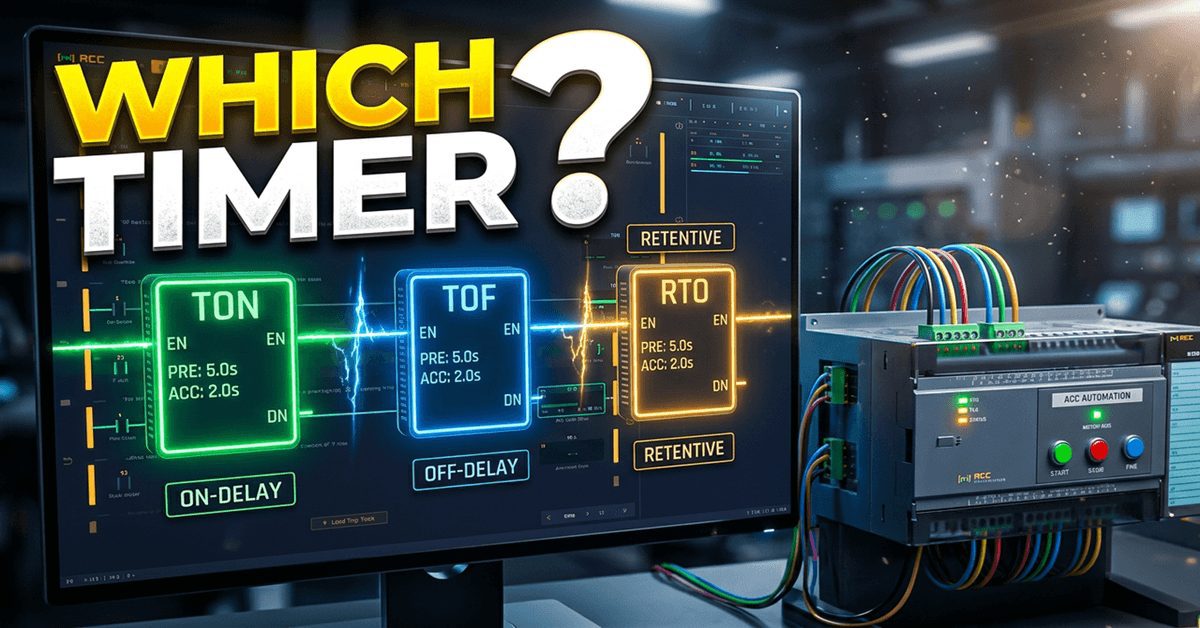
Almost every PLC program you will ever write has a timer in it. PLC timers will sound a horn before a motor starts. A fan keeps running after a heater shuts off. A pump counts its running hours until it is due for service. Those three jobs need three different timers: TON, TOF and RTO.
By the end of this post you will know exactly when each one turns its done bit on and off, what happens to its accumulated time when the rung goes false, and how to use all three together in one short program. You will build it in the free ACC PLC Simulator, connect the 3D Control Panel scene, and watch each timer work on a real start/stop station.
If timers have tripped you up before, you are in good company. The instructions look almost identical on screen. The difference is entirely in what they do when the rung changes state, and that is easiest to learn by watching it happen.
YouTube Video – Watch Now…
TON, TOF, or RTO? Which PLC Timer Should You Use?
Previously, we examined…
- 17 to 42 Instructions in One Week: The Free PLC Simulator Just Leveled Up · Video
- Run Two 3D Machines at Once — Multi-Scene PLC Simulator · Video
- I Replaced a $5,000 PLC Trainer with Free PLC Training Simulator · Video
- Can AI Program a PLC? I Tested It Live in the ACC PLC Simulator · Video
- ACC PLC Simulator — How to Use Structured Text (ST) Programming · Video
- ACC PLC Simulator: Any Gamepad Now Drives Your PLC! · Video
- PLC Programming Tutorial: Build a Conveyor System (ACC Simulator) · Video
- Control 3D PLC Scenes With Zero Hardware? Here’s How · Video
- ACC PLC Simulator – How to Use the Free Browser-Based PLC Trainer · Video
- How to Use the ACC PLC Simulator — Control Panel Scene Tutorial · Video
The Three Timers at a Glance
All three timers have an address (T1–T256 in the simulator), a preset in milliseconds (2000 = 2 seconds), an accumulator that holds the elapsed time, and a done bit. A contact addressed T1 reads the done bit of timer T1.
| TON — On-Delay | TOF — Off-Delay | RTO — Retentive On-Delay | |
|---|---|---|---|
| Times while the rung is… | TRUE | FALSE | TRUE |
| Done bit turns ON | when ACC reaches the preset | as soon as the rung goes TRUE | when ACC reaches the preset |
| Done bit turns OFF | the moment the rung goes FALSE | when ACC reaches the preset after the rung goes FALSE | only when a RES instruction clears it |
| Rung goes FALSE before the preset | ACC resets to 0 | — | ACC keeps its time |
| Typical job | Start delay, debounce, “held for 2 s” | Run-on, cool-down, purge | Run-hours, total fill time, service interval |
TON — Timer On-Delay
The TON times while its rung is true. When the accumulator reaches the preset, the done bit turns on and stays on as long as the rung stays true. The instant the rung goes false, the accumulator goes back to zero and the done bit turns off. If the rung drops at 1.9 seconds of a 2-second preset, nothing happens and the next attempt starts again from zero.
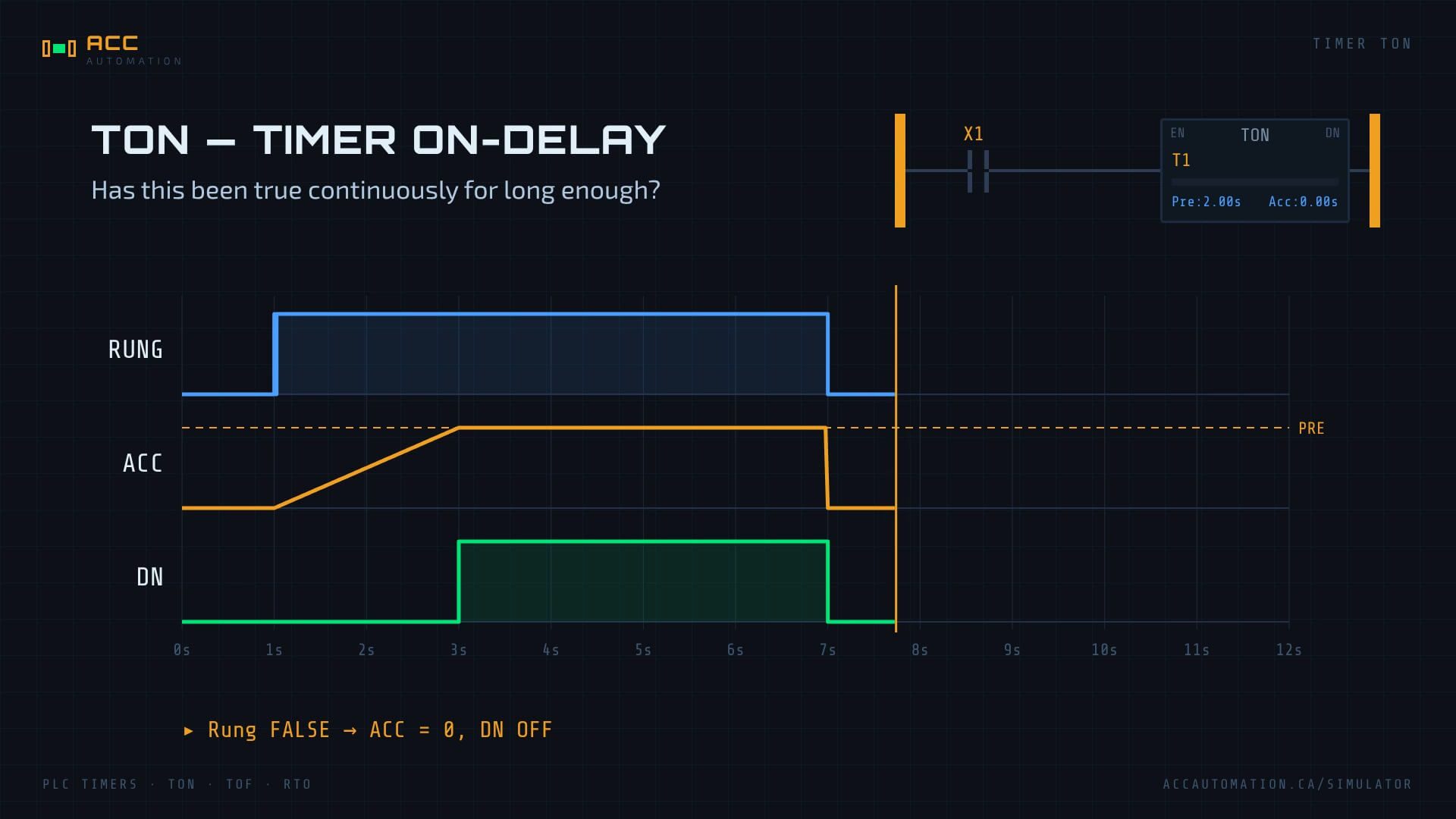
That reset is what makes the TON useful. It answers the question “has this condition been true continuously for this long?”
TOF — Timer Off-Delay
The TOF is the mirror image. Its done bit turns on immediately when the rung goes true. When the rung goes false, the timer starts timing, and the done bit stays on until the preset is reached. If the rung comes back true before then, the accumulator resets and the done bit simply stays on.
Use it when an output must keep going for a while after the thing that started it has stopped: a cooling fan, an exhaust purge, a conveyor that clears itself.
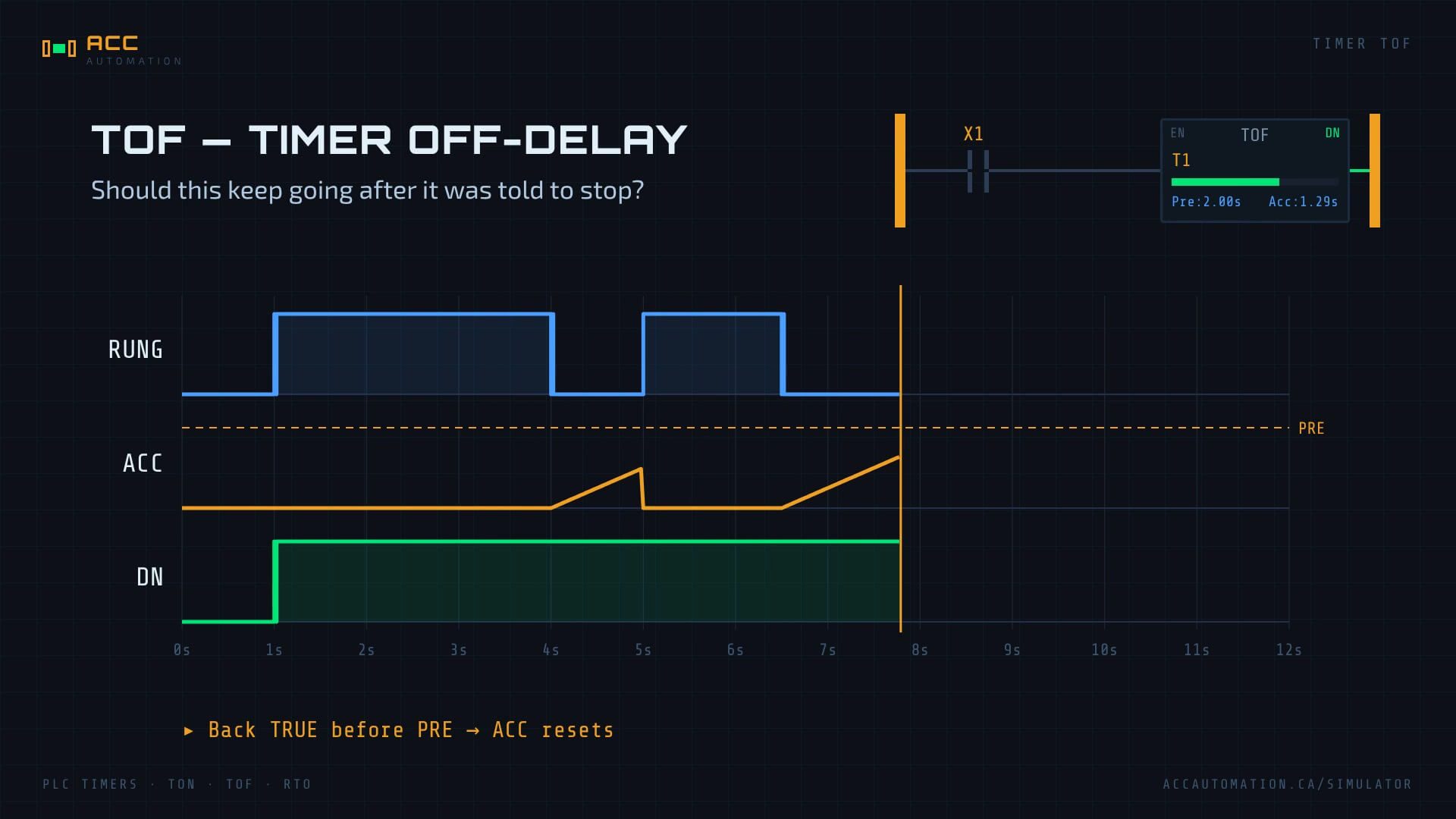
One detail worth knowing: a TOF’s done bit is off when the PLC first goes to RUN. It only turns on after its rung has been true at least once.
RTO — Retentive Timer On
The RTO times while the rung is true, just like a TON. The difference is what happens when the rung goes false: the accumulator holds its value. Turn the rung on again and it carries on from where it left off. Once the done bit turns on, it stays on even if the rung goes false.
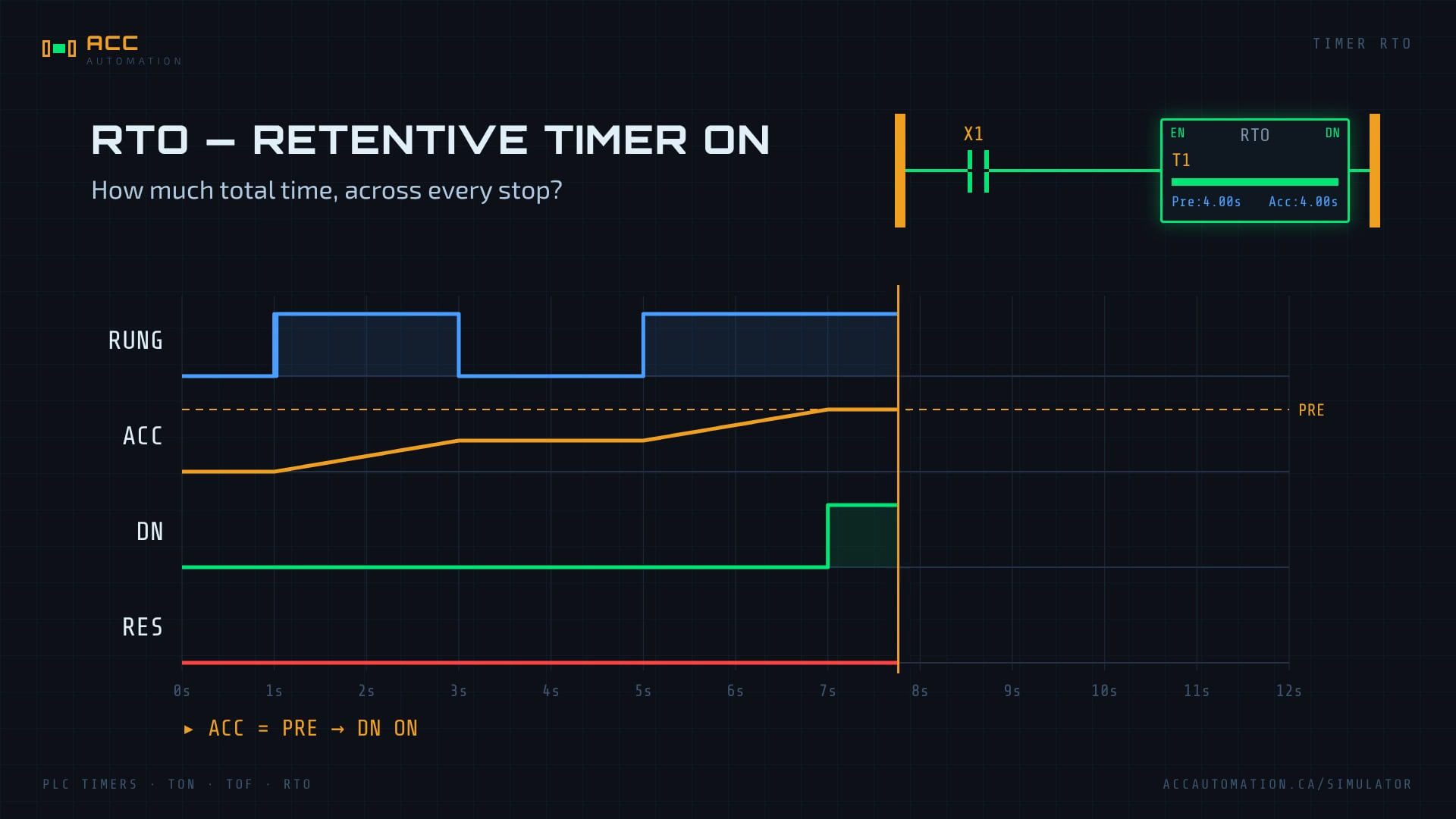
Only a RES (reset) instruction with the same address puts an RTO back to zero. Forget the RES and your RTO will never time again. That is the most common RTO mistake.
STEP 1 — Define the Task
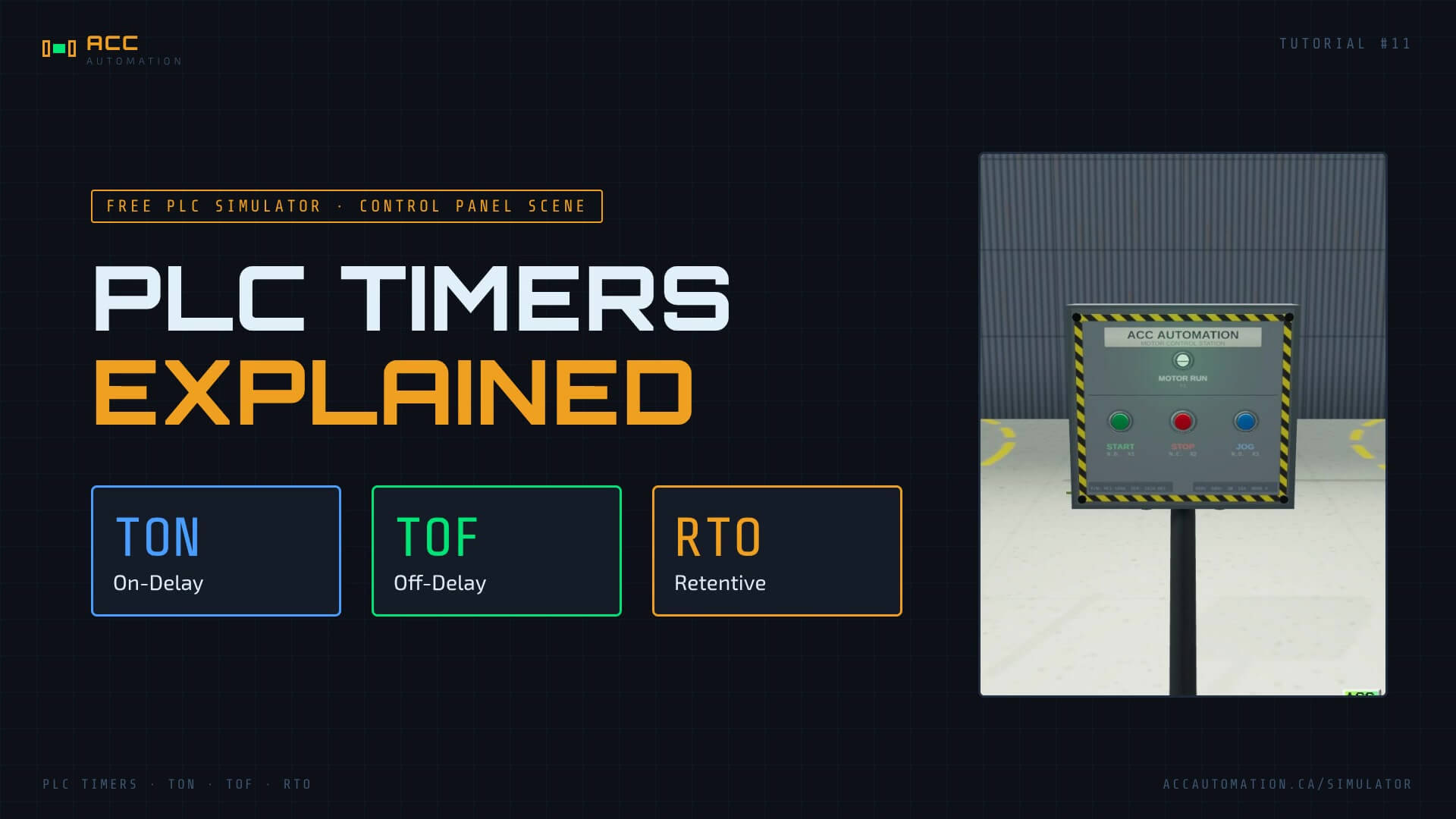
We are going to use the Control Panel scene: a floor-mounted station with Start, Stop and Jog pushbuttons and a Motor Run pilot light. In plain English, the motor must:
- Start delay (TON). After Start is pressed, wait 2 seconds before the motor runs. On a real machine this is where the warning horn sounds.
- Run-on (TOF). After Stop is pressed, keep the motor running for 5 more seconds, the way a cooling fan runs on after a heater switches off.
- Service interval (RTO). Total the motor’s running time across every start and stop. When the total reaches the service interval, stop the motor and block any restart until maintenance presses a reset.
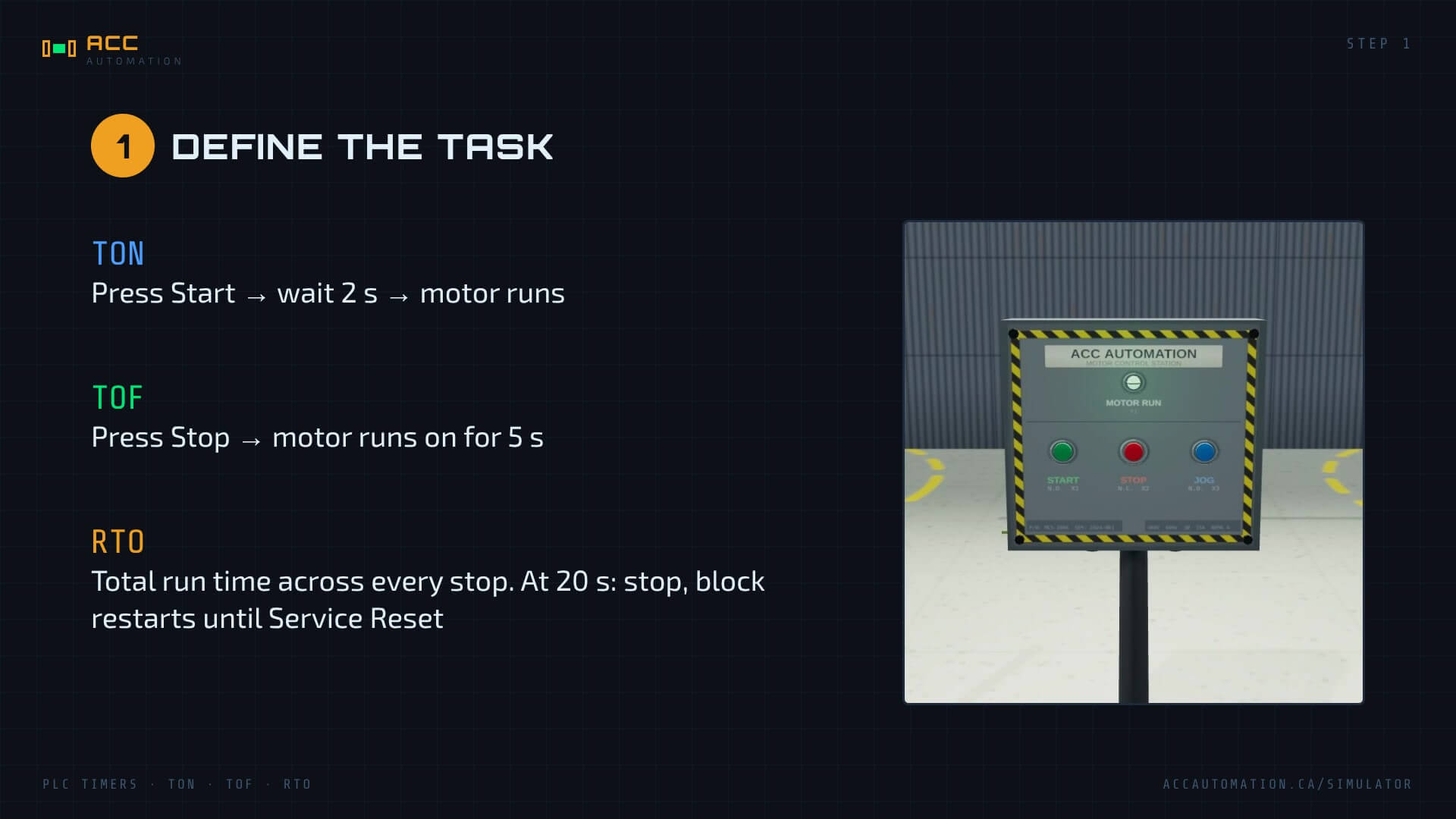
For this lesson the service interval is 20 seconds so you can see it happen. In the plant it would be something like 500 hours. The logic is identical; only the preset changes.
The Jog button is not needed for jogging here, so we use it as the Service Reset.
STEP 2 — Define the I/O
| Address | Description | Type | Modbus |
|---|---|---|---|
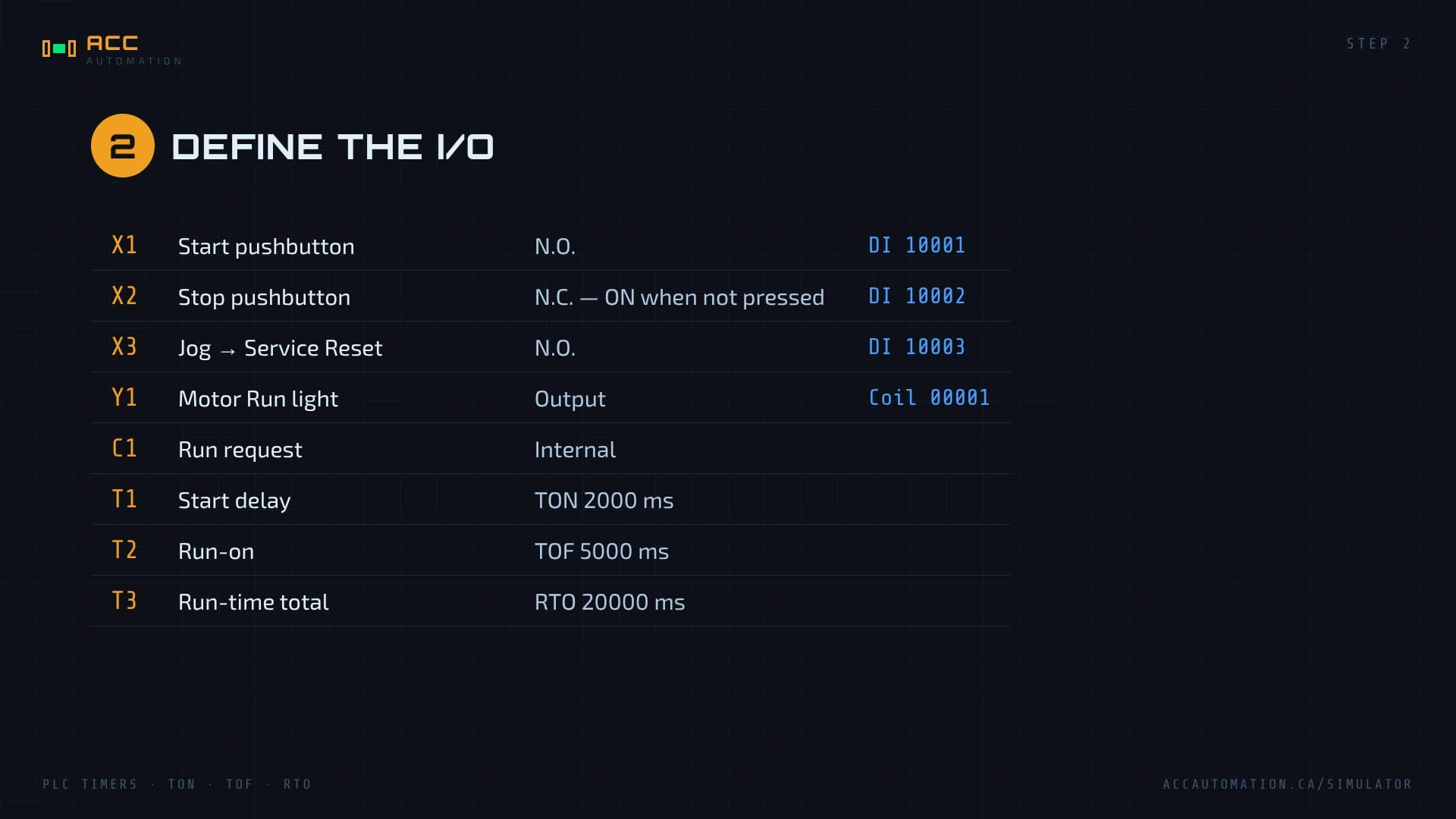
| X1 | Start pushbutton (N.O.) | Input | DI 10001 |
| X2 | Stop pushbutton (N.C. — ON when not pressed) | Input | DI 10002 |
| X3 | Jog pushbutton, used as Service Reset (N.O.) | Input | DI 10003 |
| Y1 | Motor Run pilot light | Output | Coil 00001 |
| C1 | Run request (internal) | Internal bit | — |
| T1 | Start delay — TON, 2000 ms | Timer | — |
| T2 | Run-on — TOF, 5000 ms | Timer | — |
| T3 | Run-time total — RTO, 20000 ms | Timer | — |
The Stop button is wired normally closed, so X2 is ON while nobody is pressing it. That is why the program uses a normally open contact (XIC) on X2: the rung is made until the button is pushed or the wire breaks. If you want a refresher on fail-safe stop wiring, the Control Panel scene tutorial covers it.
On an AutomationDirect Click, the Start button would land on input X001; on a CompactLogix you would create a tag such as Start_PB. The program logic stays the same.
STEP 3 — Develop the Sequence
The sequence is a chain. Each timer feeds the next:
- Start (X1) seals in the run request C1, as long as Stop (X2) is not pressed and service is not due.
- C1 drives the TON T1. After 2 seconds its done bit turns on.
- T1’s done bit drives the TOF T2. T2’s done bit turns on immediately and holds for 5 seconds after T1 drops.
- T2’s done bit is the motor, Y1.
- Y1 drives the RTO T3. It adds up every second the motor runs, across every stop.
- When T3 reaches 20 seconds, its done bit breaks the run request. The motor runs on for 5 seconds and stops. Start does nothing until X3 resets T3.
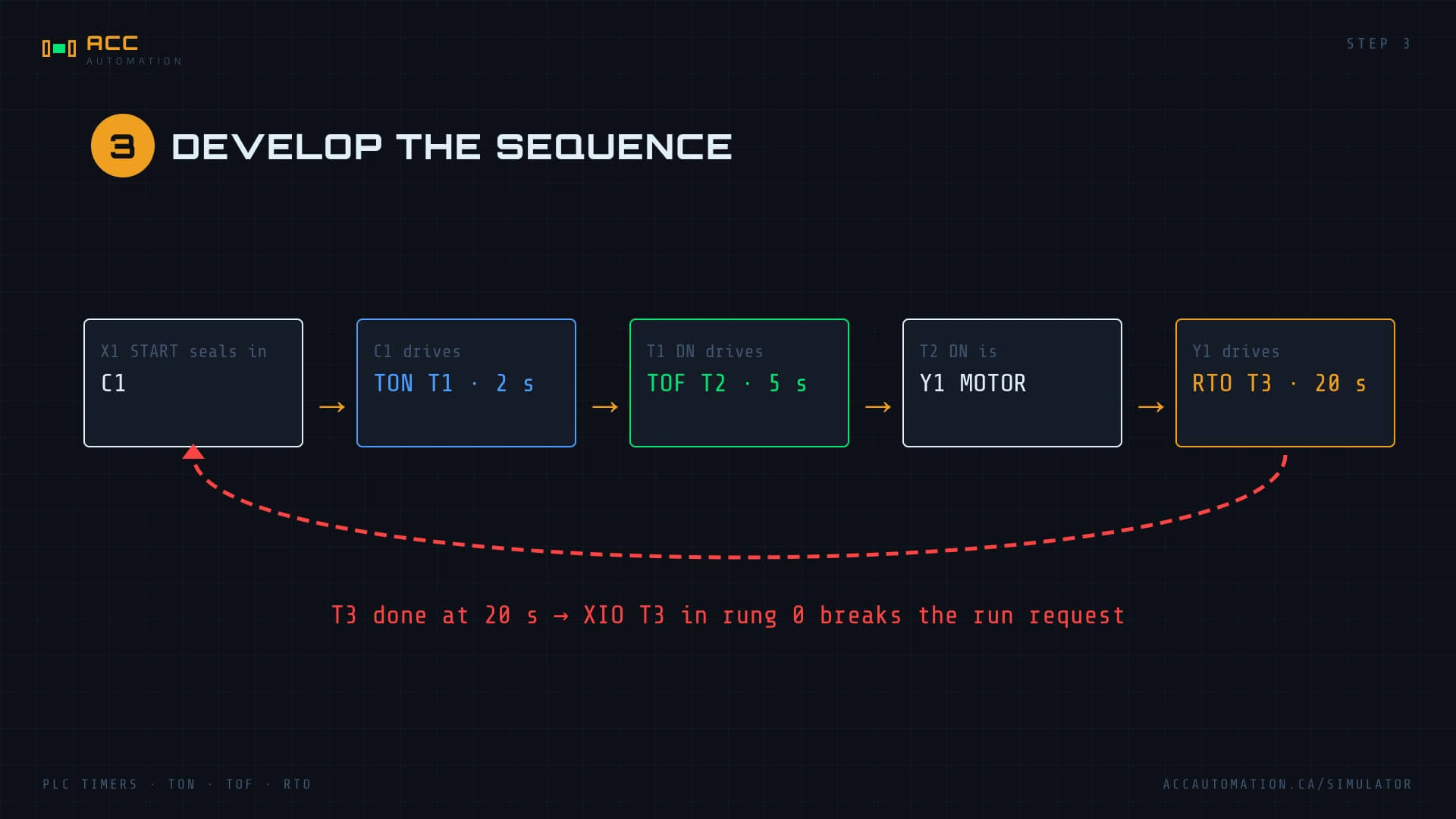
Notice that the RTO times the motor (Y1), not the run request. The motor really is running during the 5-second run-on, so that time counts toward service.
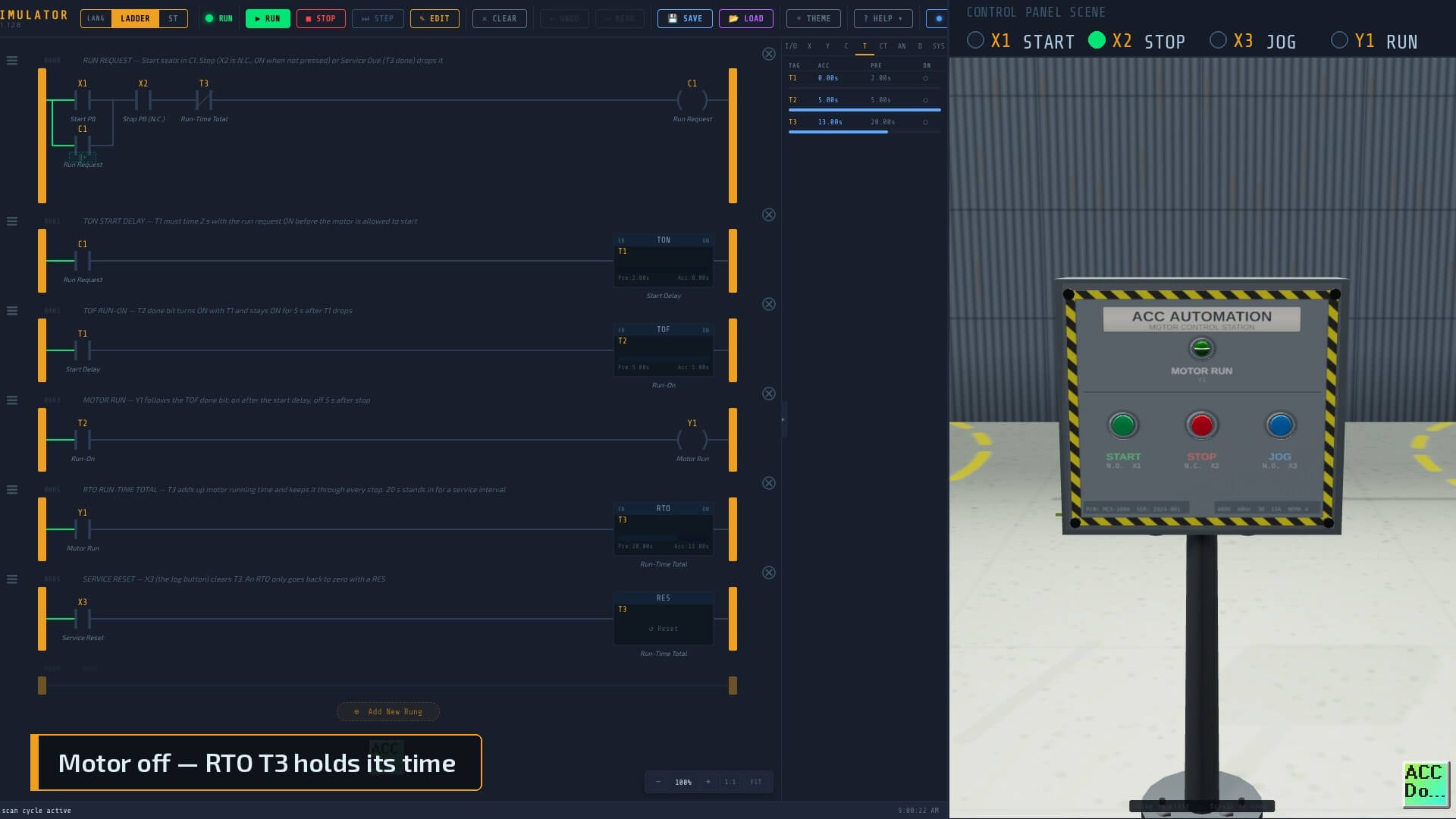
STEP 4 — Develop the PLC Program
Six rungs. Every rung is commented.
| Rung | Logic | Comment |
|---|---|---|
| 0 | ( X1 OR C1 ) AND X2 AND NOT T3 → C1 |
Run request — Start seals in; Stop or Service Due drops it |
| 1 | C1 → TON T1, PRE 2000 ms |
Start delay |
| 2 | T1 → TOF T2, PRE 5000 ms |
Run-on |
| 3 | T2 → Y1 |
Motor run follows the TOF done bit |
| 4 | Y1 → RTO T3, PRE 20000 ms |
Run-time total, kept through every stop |
| 5 | X3 → RES T3 |
Service reset — the only thing that clears an RTO |
To build it yourself, drag TON, TOF and RTO from the TIMERS section of the palette onto the rung and double-click each block to set the address and preset. Hover over any timer in the palette to see its timing chart, and press F1 to open the help page for it.
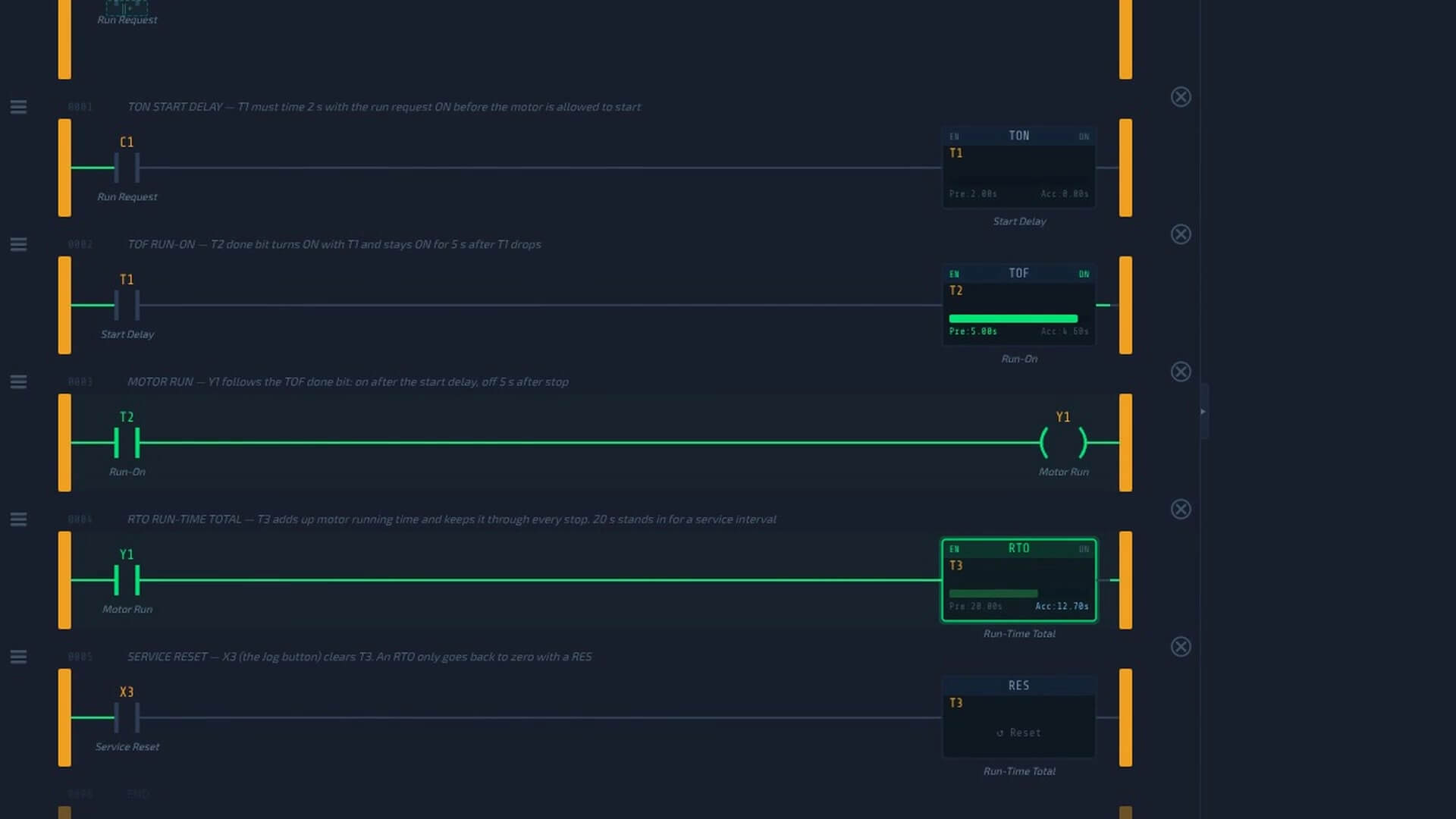
Or skip the typing: download acc-example-timers-ton-tof-rto.json and import it with LOAD.
A few things to notice in the program:
- Rung 0 uses XIO on T3 (normally closed contact). While service is not due, T3’s done bit is off and the contact passes power.
- Rung 2 is driven by T1’s done bit, not by C1. The run-on starts when the start-delay timer drops, which happens the instant C1 drops, because a TON resets as soon as its rung goes false.
- Rung 5 is the only way out of a service stop. Delete it and the RTO will sit at 20 seconds forever.
The Same Program in Structured Text
IEC 61131-3 defines TON and TOF function blocks, but there is no standard retentive timer. The usual way to build one is to time each run with a TON and bank the elapsed time when the run ends:
VAR
  RunRequest : BOOL;
  StartDelay : TON;     // 2 s on-delay before the motor starts
  RunOn      : TOF;     // 5 s run-on after the run request drops
  RunTimer   : TON;     // times the current run only
  Banked     : TIME;    // run time from every earlier run
  RunTotal   : TIME;    // retentive total = banked + current run
  ServiceDue : BOOL;
END_VAR

RunRequest := (X1 OR RunRequest) AND X2 AND NOT ServiceDue;

StartDelay(IN := RunRequest, PT := T#2s);
RunOn(IN := StartDelay.Q, PT := T#5s);
Y1 := RunOn.Q;

RunTimer(IN := Y1 AND NOT X3, PT := T#24h);
IF Y1 THEN
  RunTotal := Banked + RunTimer.ET;
ELSE
  Banked := RunTotal;
END_IF;

IF X3 THEN
  Banked := T#0s;
  RunTotal := T#0s;
END_IF;

ServiceDue := RunTotal >= T#20s;
While the motor runs, the total is the banked time plus this run. When it stops, the total is copied into the bank, so the next run picks up from there. X3 does the job of the RES. Download the full commented file: acc-example-timers-ton-tof-rto.st.
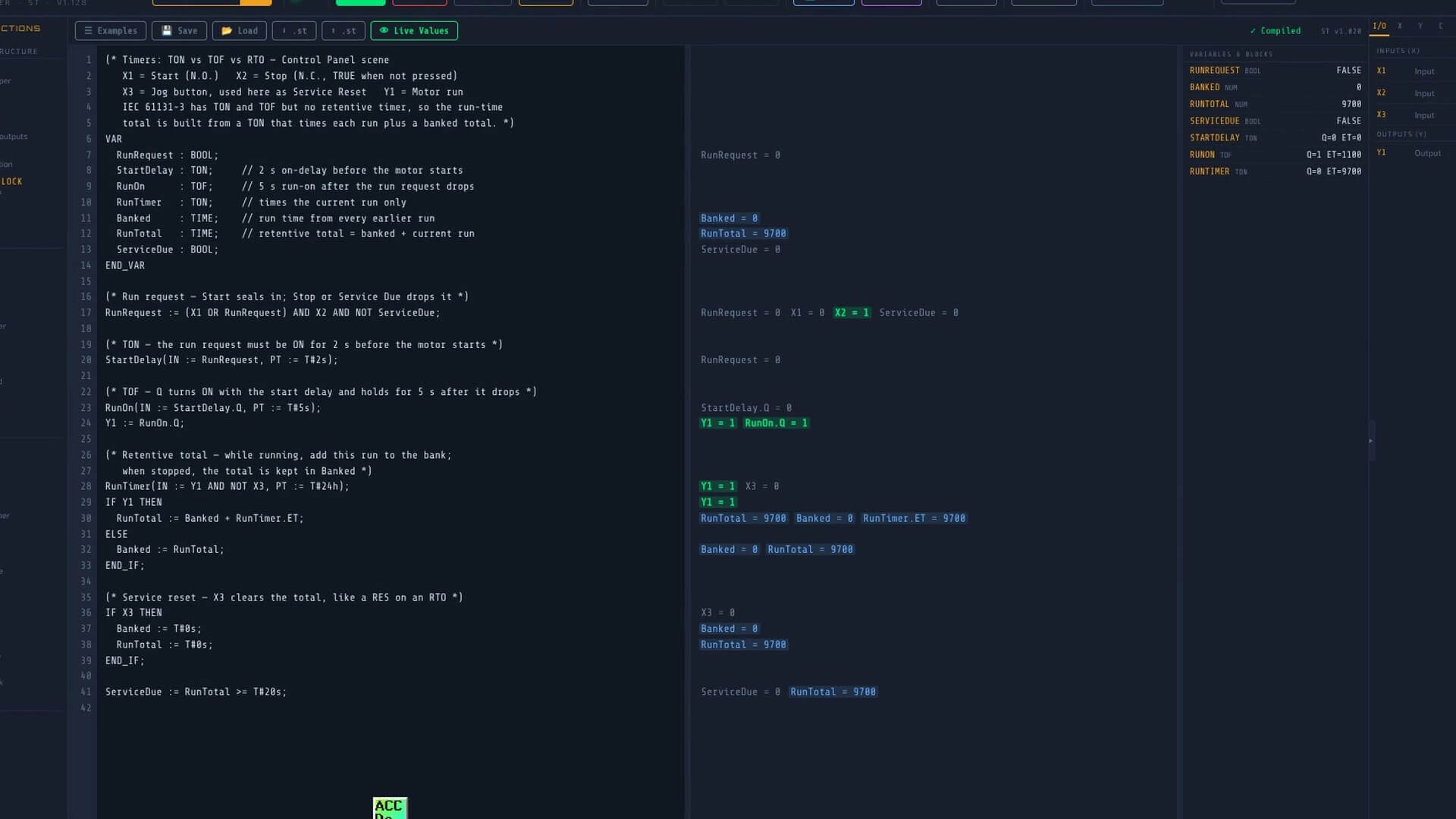
Many controllers also offer a retentive timer as a built-in block: RTO on Allen-Bradley, TONR on Siemens S7-1200/1500. If yours has one, use it; the ST pattern above is for platforms that do not.
STEP 5 — Test the Program
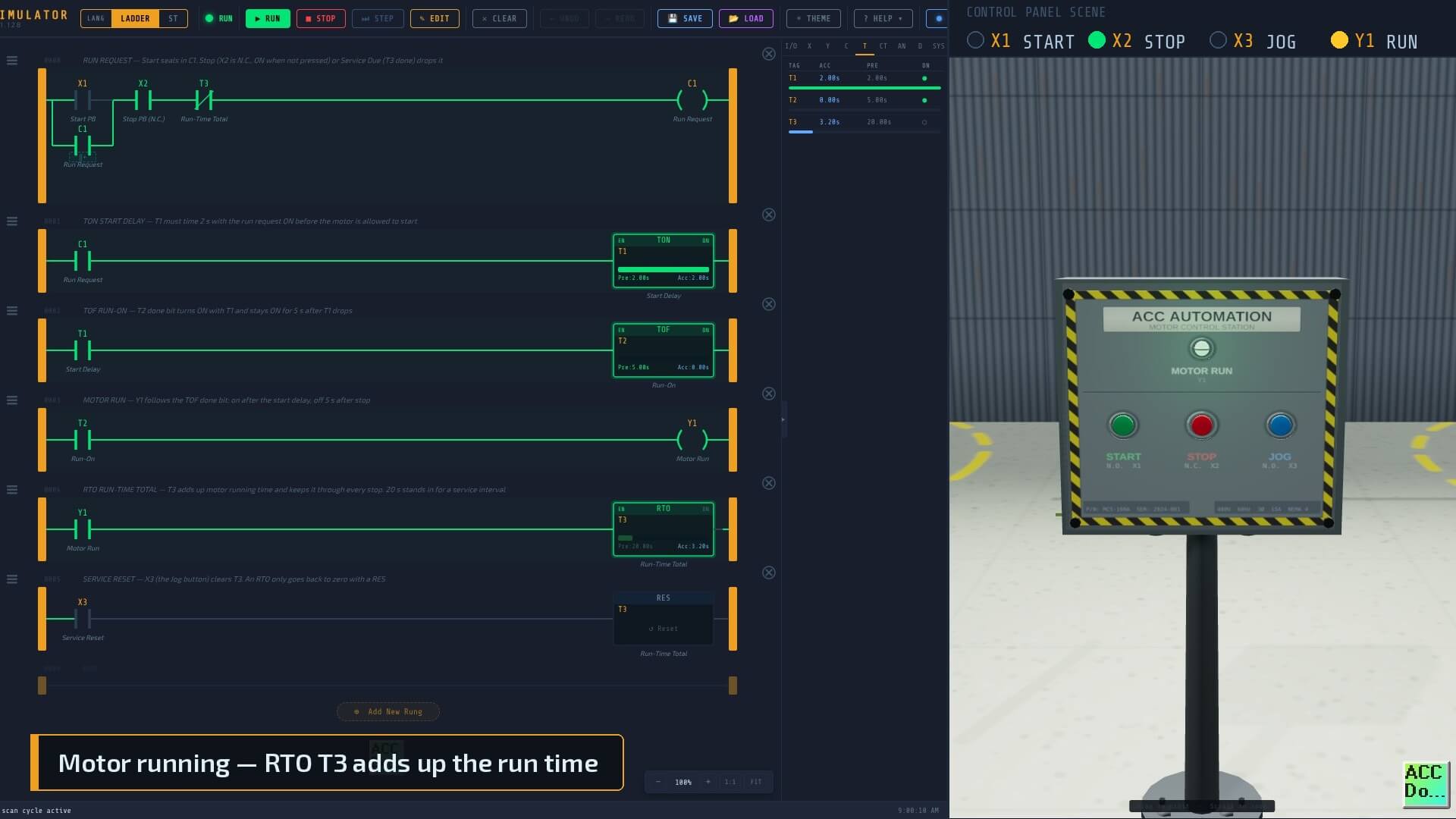
- Open the ACC PLC Simulator and load the example program.
- Click CONNECT and launch the Control Panel scene.
- Press RUN in the simulator.
Now test each timer on its own, and watch the T tab in the simulator while you do:
Test the TON. Press Start and let go. The Motor Run light stays dark while T1 counts to 2000, then lights. Press Start and Stop again quickly, inside 2 seconds: T1 resets to zero and the motor never starts.
Test the TOF. With the motor running, press Stop. C1 and T1 drop at once, but the light stays on. T2’s accumulator counts up to 5000 and only then does the light go out.
Test the RTO. Watch T3. Let the motor run for about 8 seconds, then press Stop. T3 stops at about 13 seconds (the 8 seconds plus the 5-second run-on) and holds there while the motor is off. Press Start again: T3 picks up from 13 seconds, not zero. At 20 seconds the run request drops, the motor runs on for 5 seconds and stops.
Test the interlock. Press Start. Nothing happens; service is due. Press Jog (X3). T3 clears to zero. Press Start and the motor starts again after its 2-second delay.
Test the exception cases. Press Stop during the 2-second start delay: the motor never starts. Press Start during the run-on: the TOF done bit simply stays on and the motor keeps running.
Testing with a Real PLC over Modbus
To run the same logic in your own PLC, start the bridge (node acc-modbus-bridge.js), click ⬡ MODBUS → CONNECT in the Control Panel scene, and point your PLC’s Modbus TCP client at the bridge:
| Setting | Value |
|---|---|
| IP address | Your PC’s LAN IP (127.0.0.1 for Modbus Poll on the same PC) |
| Port | 502 (or 5020 if you started the bridge with --modbus-port 5020) |
| Unit ID | 1 |
| Read inputs | FC02 Discrete Inputs 10001–10003 (X1–X3) |
| Write output | FC05 Coil 00001 (Y1) |
The timers now run in your PLC. The scene just supplies the pushbuttons and shows the light.
PLC Timers Conclusion
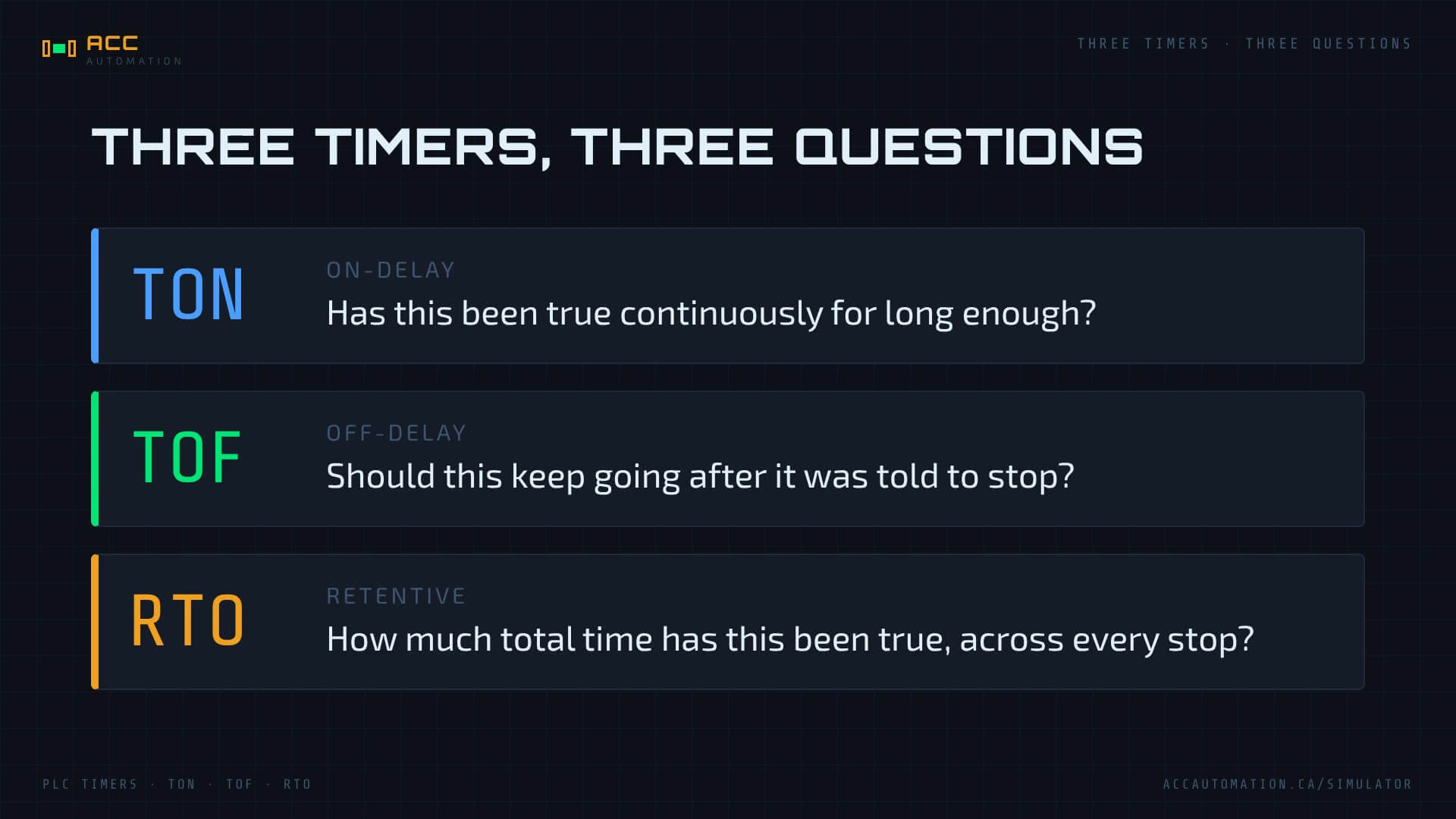
Three timers, three questions:
- TON — has this been true continuously for long enough?
- TOF — should this keep going for a while after it was told to stop?
- RTO — how much total time has this been true, across every stop?
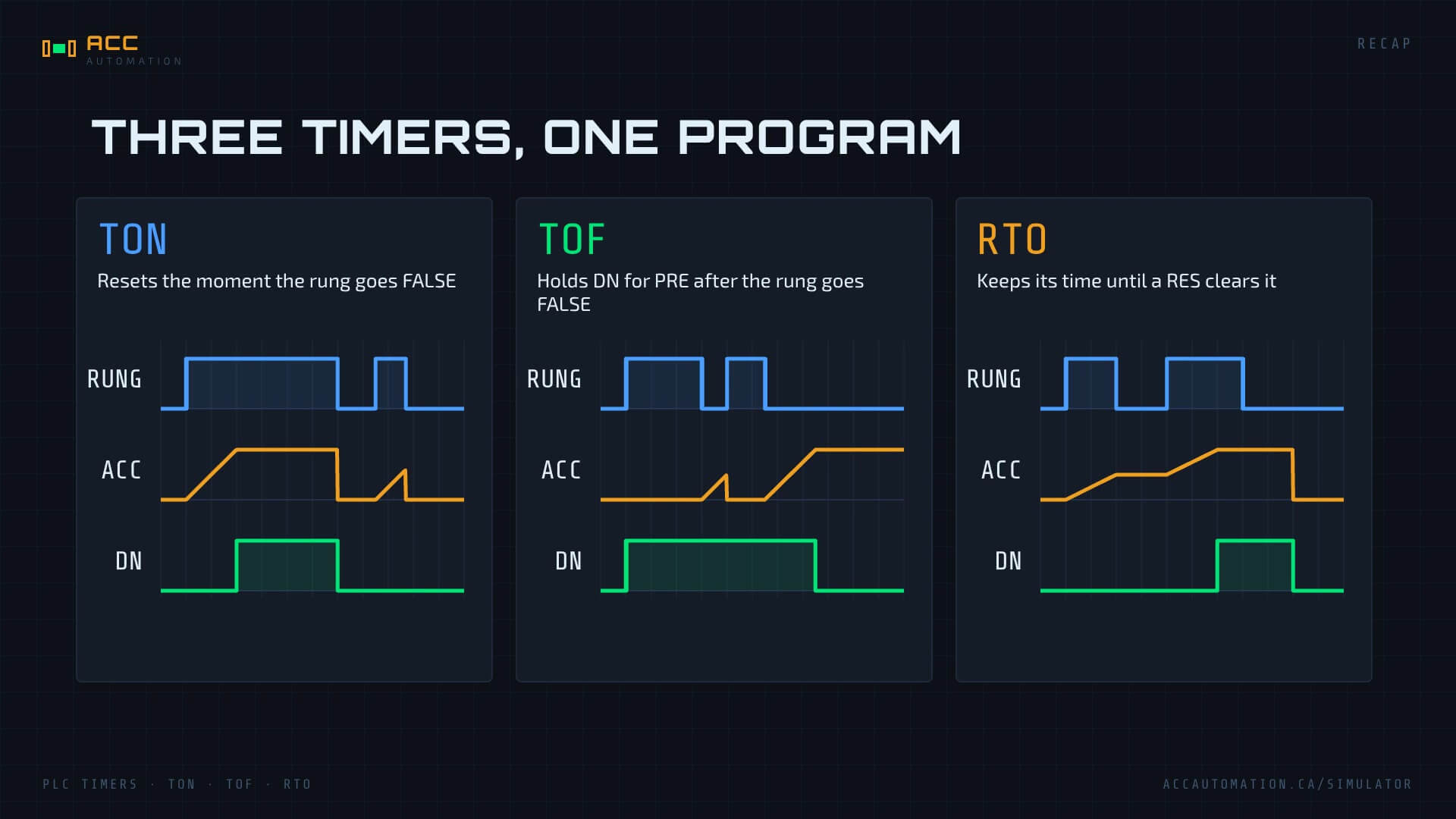
The TON resets the moment its rung goes false. The TOF holds its done bit for the preset after the rung goes false. The RTO keeps its time until a RES clears it. In one six-rung program on the Control Panel scene you have used all three, and you have seen the most common RTO bug: no reset path.
Next step: load the example into the ACC PLC Simulator, then change the presets and predict what will happen before you press Start. Next Monday we put a TON to work on the Motor Starter scene: seal-in, a normally closed stop and a 2-second warning horn.
Related posts
- How to Use the ACC PLC Simulator — Control Panel Scene Tutorial
- ACC PLC Simulator — How to Use Structured Text (ST) Programming
- 17 to 42 Instructions in One Week: The Free PLC Simulator Just Leveled Up
- Control 3D PLC Scenes With Zero Hardware? Here’s How